Case C – Unexpected Scheduled Task Creation#
MITRE ATT&CK#
Tactic: Persistence
Technique: T1053.005 – Scheduled Task/Job: Scheduled Task
This project demonstrates detection and investigation of a suspicious scheduled task created on a Windows endpoint, using Windows Security logs and Splunk.
Scenario#
A scheduled task was created on a Windows endpoint outside of expected administrative activity. Because scheduled tasks are frequently used by attackers to maintain persistent access across reboots, the activity was reviewed to determine whether the task was legitimate or a potential persistence mechanism.
Detection Logic#
For this event to be logged, the appropriate audit policy must be enabled on the endpoint. Under Local Security Policy → Advanced Audit Policy Configuration → Object Access, the setting Audit Other Object Access Events must be set to log Success events. Without this, task creation happens silently with no log entry generated:
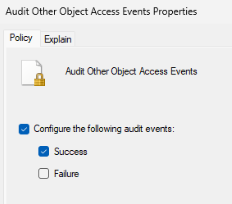
This detection targets Windows Security Event ID 4698, which is recorded whenever a new scheduled task is created on a Windows system. The Splunk alert is configured to trigger on any instance of Event ID 4698, since a single scheduled task creation event is sufficient signal to warrant investigation.
The Alert below uses the following Splunk query:
index=main sourcetype=WinEventLog EventCode=4698 ComputerName
Trigger Simulation#
To generate the activity, a scheduled task was created on the victim machine using the built-in Windows schtasks command. The task was configured to launch a hidden PowerShell process on every user logon, running under the SYSTEM account:
schtasks /create /tn "WindowsUpdateHelper" /tr "powershell.exe -WindowStyle Hidden" /sc onlogon /ru SYSTEMThe task name WindowsUpdateHelper was chosen deliberately to resemble a legitimate Windows maintenance process and to represent a common attacker technique to avoid drawing attention during casual observation.

Below is confirmation that the event was created:

Evidence#
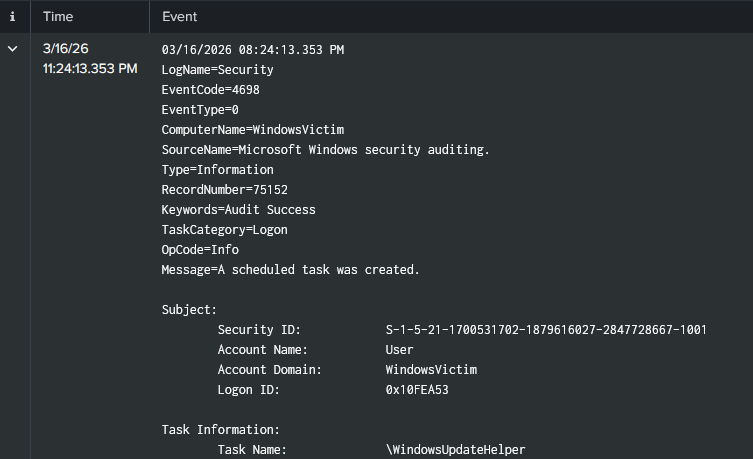
As expected, the trigger action generated Windows Security Event ID 4698 on the victim host, recording relevant source & event information.
Investigation#
After validating the alert, the underlying event was reviewed to assess the nature of the activity. Event ID 4698 confirmed that a scheduled task named WindowsUpdateHelper was created on WindowsVictim. The task was configured to execute powershell.exe -WindowStyle Hidden on every logon, running as SYSTEM.
Three characteristics stood out as inconsistent with legitimate administrative activity: the hidden execution flag suppresses any visible window when the task fires, the SYSTEM privilege level exceeds what normal task creation requires, and the task name is designed to blend in with legitimate Windows processes. No evidence of the task having executed was observed within the investigation window.
Findings#
A scheduled task was created on WindowsVictim configured to run a hidden PowerShell process as SYSTEM on every logon. The task name was chosen to mimic legitimate Windows activity. The combination of hidden execution, elevated privilege, and a persistent logon trigger is consistent with an attacker establishing persistence on a compromised endpoint.
Remediation & Recommendations#
The task should be disabled and removed immediately pending full investigation of the host and creating account. Going forward, scheduled task creation should be restricted to administrative accounts via Group Policy, and existing tasks on endpoints should be audited for similar characteristics. Enabling PowerShell script block logging alongside task auditing provides visibility into the full execution-to-persistence chain.